MikroTik Hardware Licensing
Licensing Basics
MikroTik hardware routers that run RouterOS come with a license pre-installed. If you have purchased a RouterOS-based device, no additional steps are required.
RouterOS License Key Levels
Licensing information can be retrieved from the CLI system console:
[admin@MikroTik] > /system/license/print
    software-id: "ABCD-1234"
         nlevel: 6
       features:
[admin@MikroTik] >
The same information can also be viewed in WinBox or WebFig.
[admin@MikroTik] /system/license/print
  software-id: TRPC-YYR2
   expires-in: 23h48m24s
The differences between license levels are shown in the table below:
Level 2 was a transitional license from the legacy (pre-2.8) license format. These licenses are no longer available.
Existing Level 2 licenses will continue to function, but upgrading requires the purchase of a new license.
Level 3 licenses are intended for wireless station (client/CPE) use only.
| Level Number | 0 (Trial Mode) | 1 (Free Demo) | 3 (WISP CPE) | 4 (WISP) | 5 (WISP) | 6 (Controller) |
|---|---|---|---|---|---|---|
| Price | no key | Free (Registration Required) | not for sale | $45 | $95 | $250 |
| Wireless4 AP mode (PtMP) | 24h trial | - | no | yes | yes | yes |
| Wireless6 AP mode | - | - | yes | yes | yes | yes |
| PPPoE tunnels | 24h trial | 1 | 200 | 200 | 500 | unlimited |
| PPTP tunnels | 24h trial | 1 | 200 | 200 | 500 | unlimited |
| L2TP tunnels | 24h trial | 1 | 200 | 200 | 500 | unlimited |
| OVPN tunnels | 24h trial | 1 | 200 | 200 | unlimited | unlimited |
| HotSpot active users | 24h trial | 1 | 1 | 200 | 500 | unlimited |
| User Manager active sessions | 24h trial | 1 | 10 | 20 | 50 | unlimited |
If a feature is not listed, it is not restricted by the license.
RouterBOARD Software ID is bound to the device storage.
All Licenses
- Never expire — a running, licensed router can be used indefinitely.
- Support an unlimited number of interfaces.
- Are valid for a single installation each.
- Include unlimited software upgrades.
wifi-qcom drivers support PTMP operations regardless of license level. Mode: AP is universally available on all wifi-qcom devices, enabling connections from multiple client stations.
Upgrading the device license level
If you need to upgrade the device license level, you must purchase a higher-level license either as a Prepaid key or directly as a RouterOS license tied to the device Software ID.
The license key is provided as a block of characters. It can be copied from your MikroTik account or from the email you received after purchase, and then pasted into the router. You can paste the key directly into the terminal or use the Paste Key option in the WinBox License menu. A reboot is required for the license to take effect.
Prepaid Key
A Prepaid Key is a type of license that can be purchased in advance for MikroTik products. It allows you to acquire a license without immediately assigning it to a specific device. Once obtained, a Prepaid Key can be used to upgrade a CHR instance or converted into a license key for an x86 system or RouterBOARD device using the target Software ID.
How to Purchase a RouterOS License Key
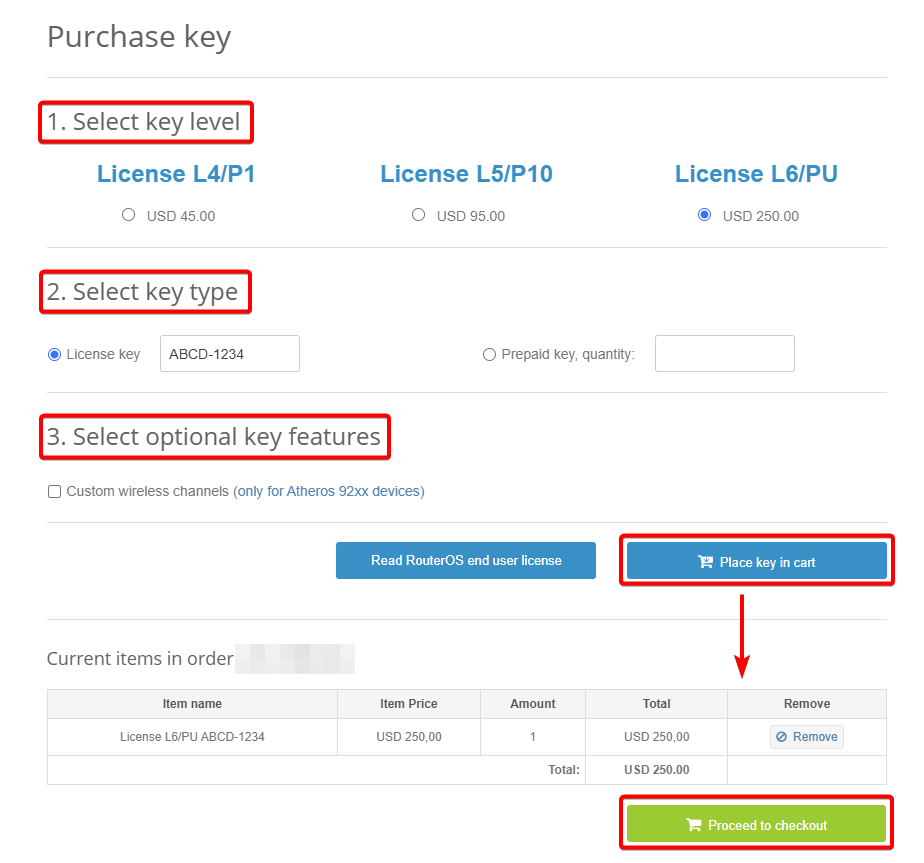
- Go to mikrotik.com and log in to your account.
- Navigate to the "Purchase a RouterOS License Key" section.
- Select the desired license Key Level.
- Set the Key Type to "License key".
- In the License Key Information field, paste the Software ID of your device.
- Select any optional Key Features required for your deployment.
- Click the "Place key in the cart" button.
- Click "Proceed to checkout" to finalize your purchase.
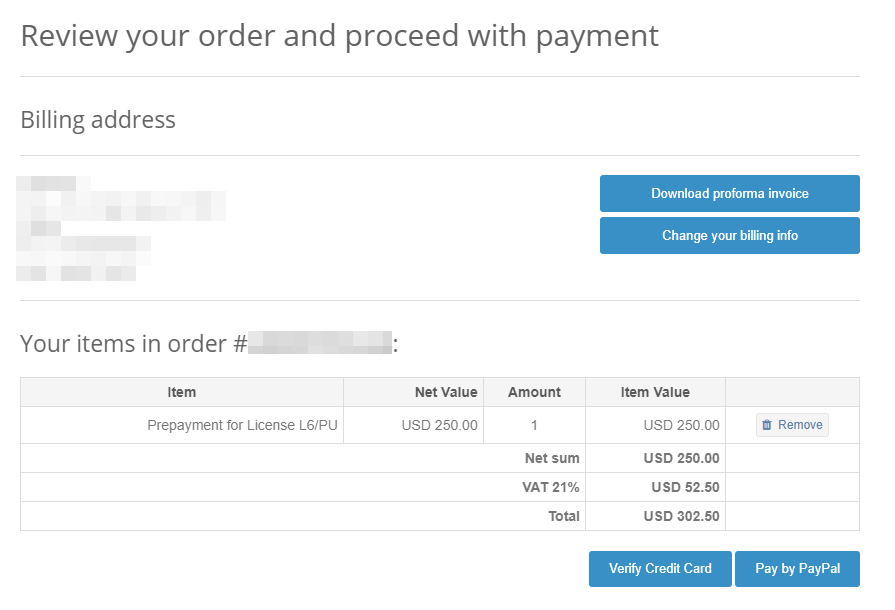
Review and Complete Your Purchase
Review your order details carefully, then proceed with payment using either a Credit Card (CC) or PayPal.
Congratulations! You have successfully purchased a RouterOS license key.
How to Convert a Prepaid Key to a RouterOS License Key
-
Purchase a RouterOS Prepaid Key.
- Log in to your mikrotik.com account.
- Purchase a RouterOS Prepaid Key if you have not done so already.
-
Access the "Make a Key from Prepaid Key" Section.
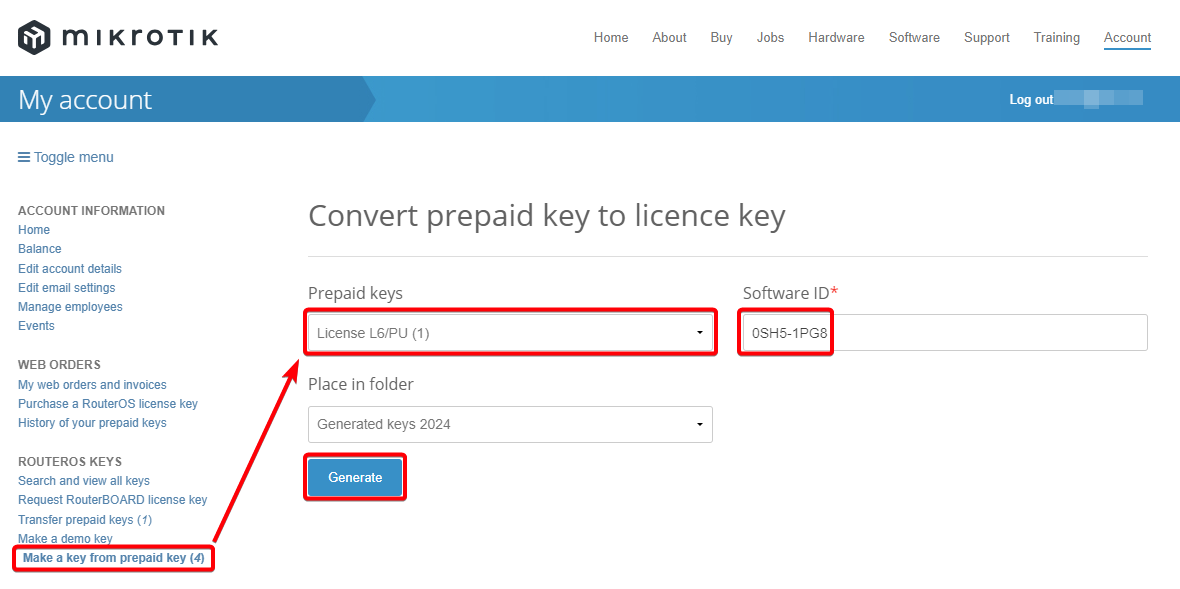
- Navigate to the "Make a key from prepaid key" section in your account.
-
Select and Convert the Prepaid Key.
- Select the desired Prepaid Key from the list.
- Enter the Software ID of the router for which you want to upgrade the license level.
-
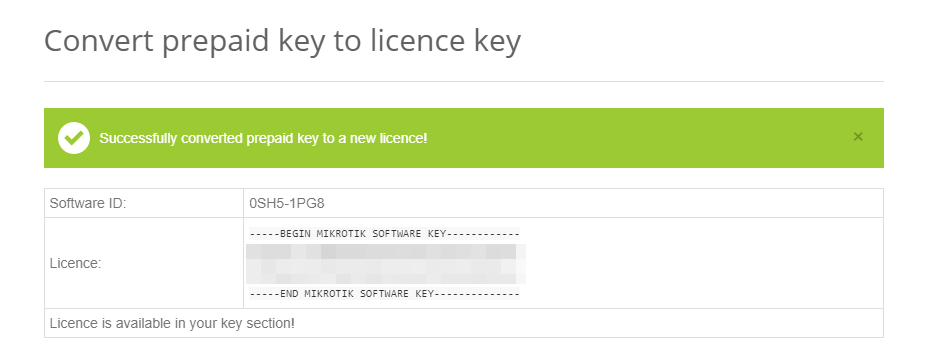
Generate the License Key.
- Press "Generate".
- A confirmation message will appear: "Successfully converted prepaid key to a new licence!".
-
Apply the License Key.
- Copy the generated license key.
- Paste it into the device to apply the license.
You have successfully converted a Prepaid Key to a license key for your router.
Obtaining and Managing Licenses
Where can I buy a RouterOS license key?
All MikroTik hardware devices include a preinstalled RouterOS license.
If You Have Lost a License on Your Device
If you have lost the license from your router for any reason, upgrade the router to the latest available RouterOS version and use the "Request license key" option in your mikrotik.com account. When submitting the request, use the Software ID and serial number found under the /system/license menu in RouterOS. Once received, apply the license key to your device. If the request feature does not work, contact support@mikrotik.com for assistance.
My router has lost the license, can I request a Replacement Key?
No, Replacement keys are available for x86 only.
If the license was lost due to repairs that were not performed by a distributor under warranty, you will be required to purchase a new RouterOS license at full price.
Using the License
Can I transfer a MikroTik hardware license?
MikroTik hardware includes an embedded license that is permanently tied to the device. This license cannot be transferred to another system under any circumstances. This restriction also applies to any license upgrades that were applied to the router while it was operational.
Is it possible to upgrade or transfer the router license to an x86 system or a CHR license?
Transferring the device license is not possible.
Related Guides
x86 Installation
Covers RouterOS x86 system requirements and installation methods, including USB and Netinstall deployment.